Case Study

From document chaos to a tax‑optimized plan in one meeting.

Follow Sarah, a wealth advisor, as she onboards a new client with seven equity grants across two companies — and builds a multi-year trading plan using Gemifi.

The Scenario

Seven grants. Two companies. Zero clarity.

David is a senior engineer at a publicly traded tech company who also holds equity from a previous private-company stint. He walks into his first meeting with a stack of grant documents, broker PDFs, Carta screenshots, and a vague memory of his vesting schedules. ISOs, NQOs, RSUs across two companies — and no clear picture of what he owns or what to do with it.

This is exactly the mess Gemifi was built to untangle.
On Screen

What Sarah can show in the first meeting

The workflow is only useful if the client can immediately see the payoff. Gemifi turns the intake work into a dashboard and a plan configuration view Sarah can walk through live with David.

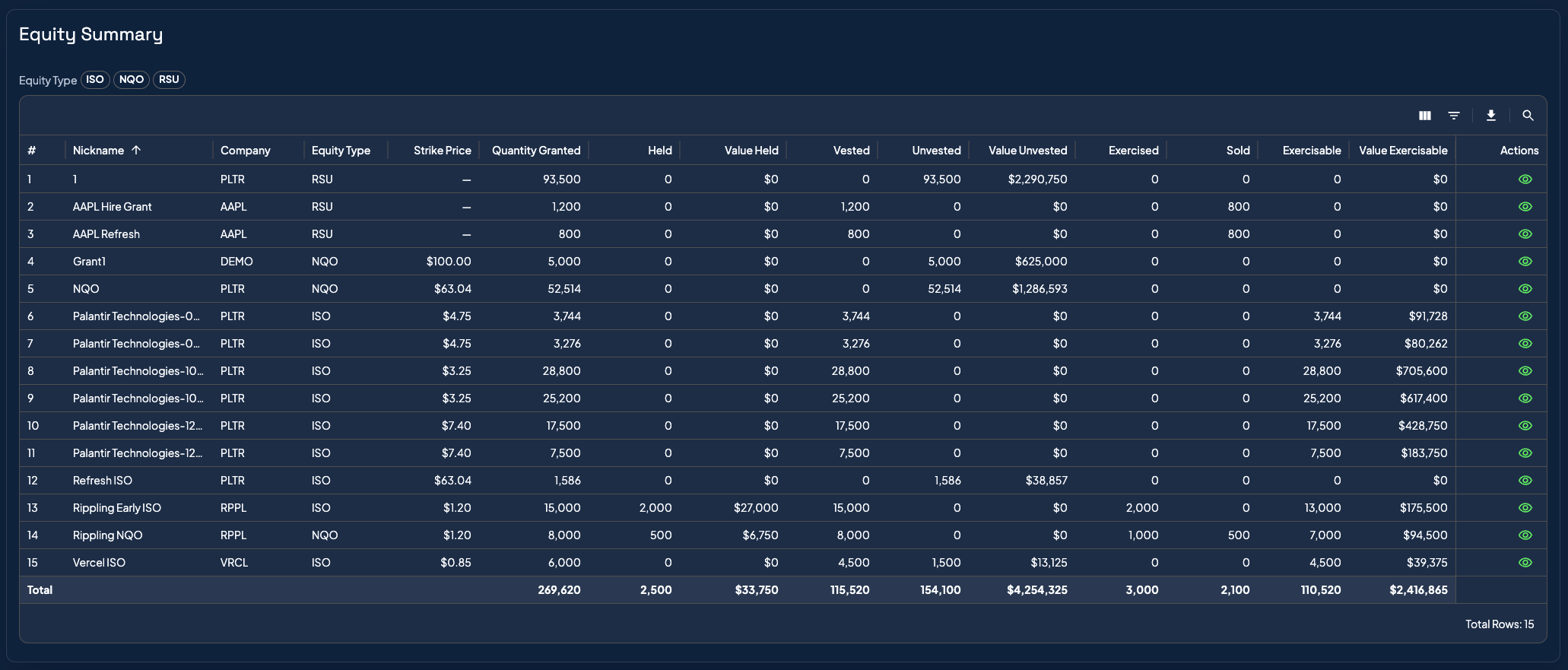
Gemifi equity summary table showing grants across companies, vesting, exercisable shares, and values.

One view of the full equity picture

Once the imports are reconciled, Sarah can sort every grant, lot, vesting event, and value driver in a single dashboard instead of stitching together screenshots and spreadsheets.

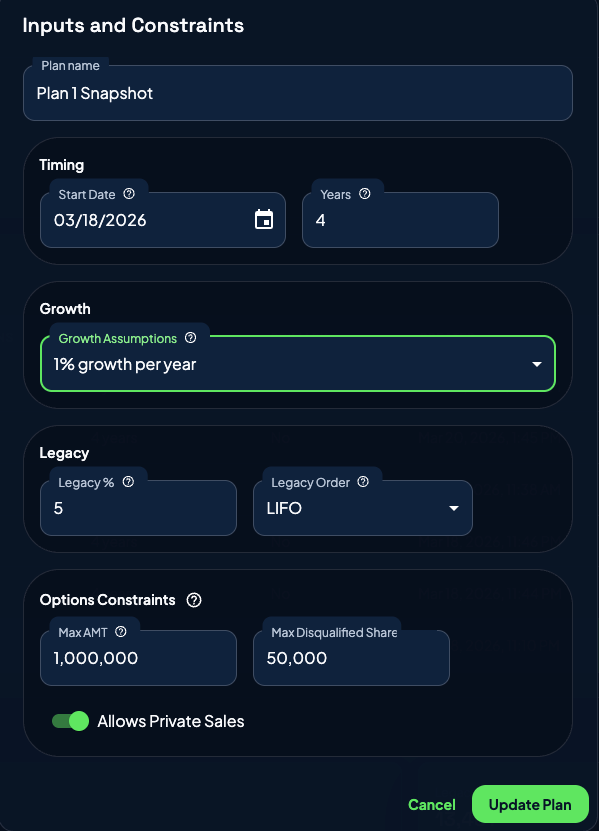
Gemifi plan constraints panel showing timeline, growth assumptions, and options constraints.

Planning guardrails stay explicit

David's plan constraints stay visible while the optimizer runs, so the strategy conversation stays grounded in actual AMT, timing, and legacy-hold limits.

Phase 1

Client intake in minutes, not hours

David walks in with a banker's box of grant documents, broker PDFs, Carta screenshots, and a vague memory of his vesting schedules. Sarah creates his client record, links his two employers from the shared company library, and moves straight to import.

  • Lean client creation — name and email, no bloated intake forms
  • Shared company library across the entire advisory team
  • Automatic deduplication and data normalization

Phase 2

AI Importer turns document chaos into structured grants

Sarah drags David's files into the AI Import drop zone — an E*Trade CSV, a legal award PDF, and a screenshot from his broker app. The AI reads everything, cross-references sources, extracts all seven grants with full vesting schedules, and asks Sarah targeted questions only when there's genuine ambiguity.

  • Accepts PDFs, CSVs, images, and clipboard pastes
  • Classifies sources by trust level — legal docs override screenshots
  • Conversational review: the AI explains what it found and asks only when needed
  • Grant-by-grant review dialog with inline editing and validation warnings
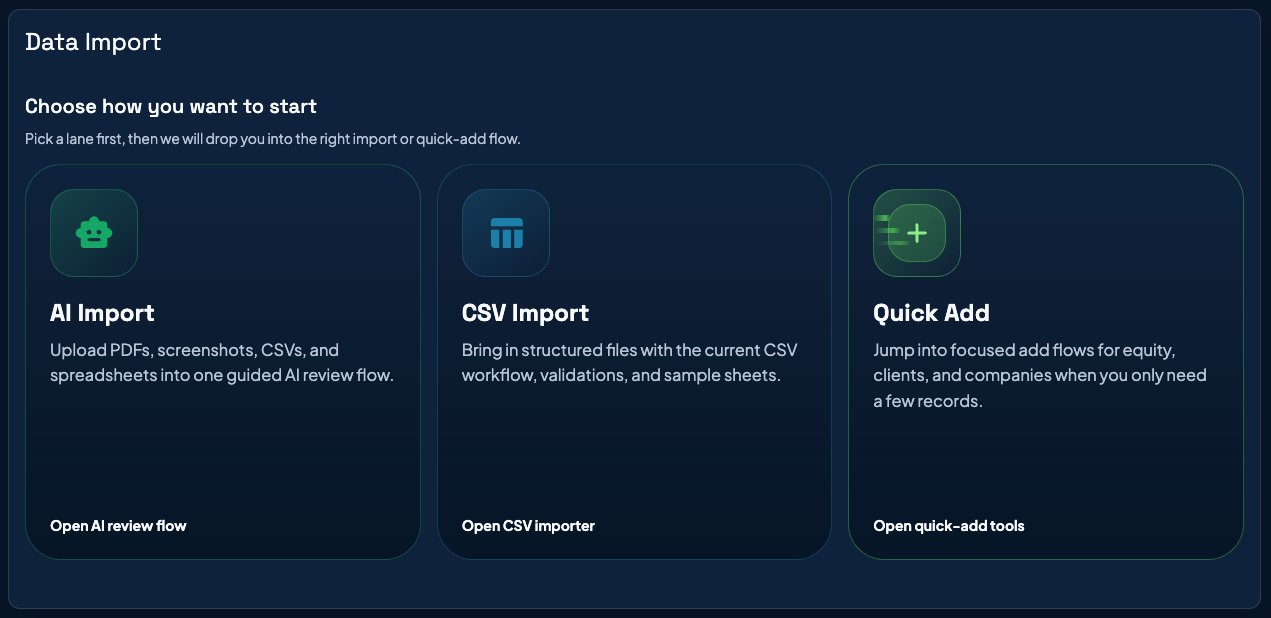
Gemifi data import screen showing AI Import, CSV Import, and Quick Add options.
The advisor can start with AI Import for mixed documents, CSV Import for structured files, or Quick Add for focused live updates.

Phase 3

The full equity picture, live and interactive

With all grants imported, Sarah has a comprehensive equity dashboard for David — organized by company, showing every grant, every lot, every vesting event. This is the "swivel the monitor" moment where David sees exactly what he owns, what's vesting when, and what it's all worth.

  • At-a-glance snapshot: total shares, exercisable options, unvested equity, LTCG-qualified ISOs
  • Sortable grant grid with calculated values and quick type filtering
  • Individual grant detail with annual summary, action history, and vesting schedule
  • Complete audit trail — who changed what and when

Phase 4

Build a tax-optimized trading plan in seconds

Sarah configures a 5-year plan with David's AMT cap, legacy hold target, and growth assumptions. Gemifi's plan engine runs a multi-step optimization — analyzing exercises, prioritizing tax-efficient sales, enforcing AMT constraints, and generating a concrete, sequenced action schedule.

  • Configurable AMT cap, exercise cost limit, and legacy hold percentage
  • 7-step optimization: load inputs → analyze exercises → prioritize sales → balance holds → apply constraints → check windows → finalize
  • Full AMT tracking with credit carryforward across tax years
  • Uses David's actual tax profile — not generic tables

Phase 5

Compare scenarios, quantify the tradeoffs

Sarah builds a second plan with more aggressive assumptions and opens the side-by-side comparison. Now the strategic conversation gets concrete: "Here's what happens if we exercise aggressively and eat the AMT this year. And here's what happens if we spread it out. The net difference over 5 years is $X."

  • Side-by-side plan comparison with annual or monthly granularity
  • Trading metrics: total shares sold, total exercised
  • Tax metrics: LTCG, STCG, AMT, total tax, gross proceeds
  • Visual charts showing exactly where plans diverge

Phase 6

Ongoing management that keeps pace with life

Six months later, David has a new RSU grant. Sarah uses Quick Add right in the meeting — selects the company, picks a vesting template, enters the details, and the dashboard updates instantly. When tax season arrives, Gemifi produces lot-level records with cost basis, holding periods, and gain classification ready for the CPA.

  • Quick Add with pre-built vesting templates for live client meetings
  • FMV history tracking for private companies cascades to all clients automatically
  • Trading window management for 10b5-1 compliance
  • Exportable, lot-level tax records that replace the annual CPA scramble

The Difference

What Gemifi replaces

Manual PDF transcription into spreadsheets

AI Importer extracts grants from any document in minutes

Scattered records across broker platforms

Unified dashboard — every grant, company, and lot in one place

Back-of-napkin exercise timing

Trading plan builder with AMT caps and multi-year projections

"Trust me, I did the math"

Side-by-side plan comparison with quantified tax impact

Tax-season data scramble

Lot-level tax records ready for the CPA

Advisor-specific spreadsheets that can't scale

Shared platform with RBAC, audit trail, and consistent data

Meeting Outcome

By the end of the session, David has answers instead of fragments.

Inventory

Every grant is imported, normalized, and tied back to the underlying documents.

Strategy

Sarah can explain a recommended sequence of exercises and sales with tax tradeoffs in plain English.

Follow-Through

The plan lives in a system the whole advisory team can revisit as grants, prices, and life events change.

See it for yourself

Bring your own client scenario.

We'll walk through data import, scenario modeling, and reporting using a representative client profile — or your own anonymized case.